



The Full Guide to the Play Disney Parks App

We’re convinced most Disneyland guests are walking past one of the best free tools the resort offers without ever knowing it exists. The Disneyland app, the one you use for wait times, mobile order, and Lightning Lane, isn’t the only app worth having on your phone in the parks. There’s a second one, called Play Disney Parks, and it’s built entirely around one goal: making your standby wait actually fun instead of just something to survive.
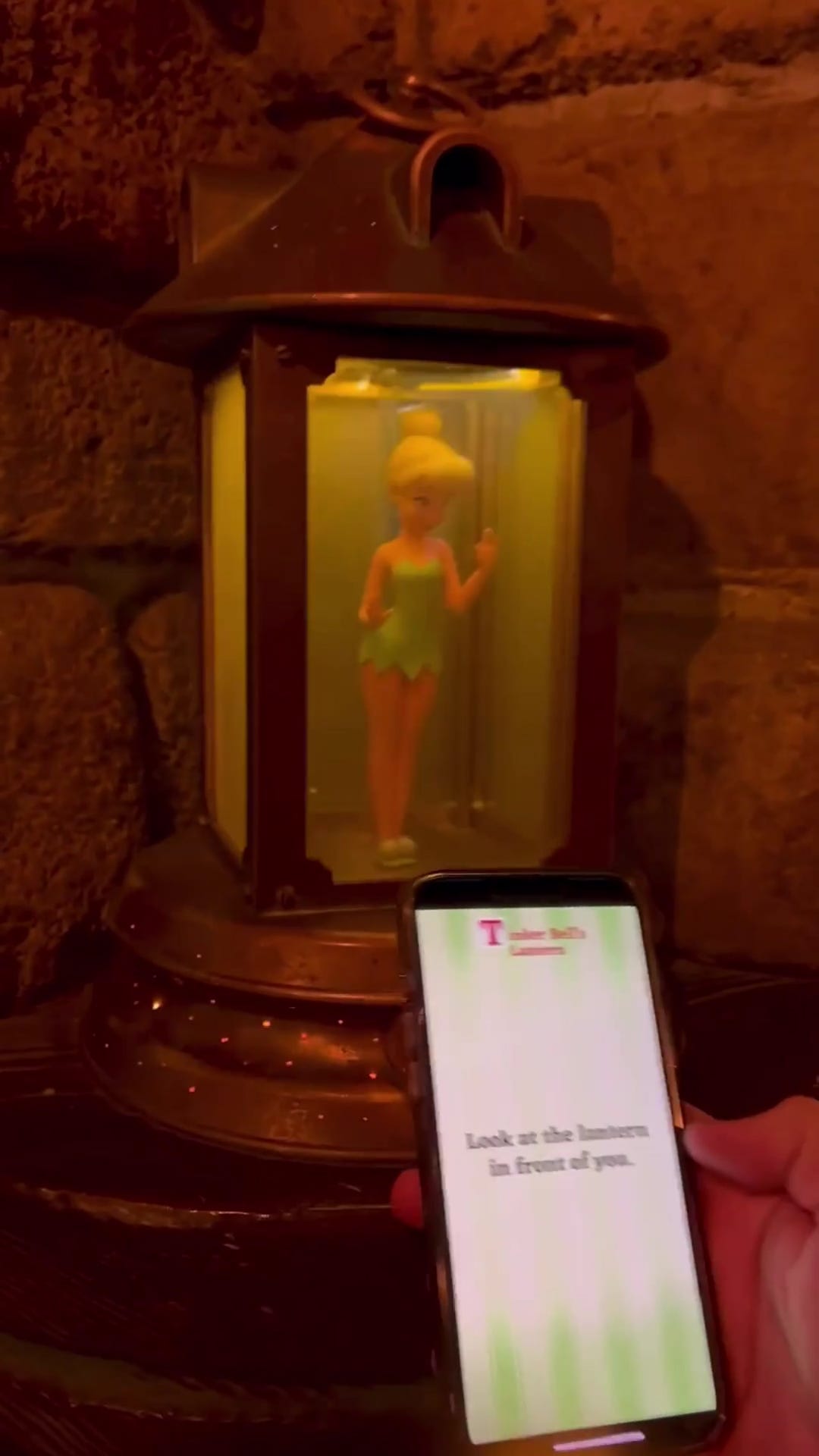
We first discovered it years ago in the Peter Pan’s Flight queue, when a lantern near the loading area suddenly had Tinker Bell appear inside it on our phone screen — no warning, no sign telling us to look for it, just a genuinely delightful surprise that our kids still talk about. Since then, we make a point of opening it up any time we’re standing in a standby line at Disneyland, because it turns out there’s a lot more built into it than we ever expected.
What the App Actually Does
Play Disney Parks is free, works on both iOS and Android, and covers three main categories:
- Interactive queue experiences — games and story moments that only unlock once you’re physically standing in the standby line for specific attractions.
- General games, trivia, and playlists — content you can access anywhere in the resort (or even at home) that doesn’t require being in a specific queue.
- Hidden effects built right into the physical queues — real props and set pieces that only activate visually for app users, blended so seamlessly into the environment that most guests walk right past them without noticing.
One important note: the interactive queue games only work in the standby line. If you’re using Lightning Lane, you’ll bypass most of the queue entirely, which means you’ll miss the interactive content built into that line — one more small reason to consider standby when the wait isn’t too bad and you’ve got kids who’d enjoy the game.
Where to Find It: Attraction by Attraction
Peter Pan’s Flight (Disneyland Park) — Our personal favorite, and the one most people remember first. As you move through the queue, the app prompts your group to share happy memories and positive thoughts — building toward your own “happy thought,” which is exactly what Peter needs to fly. When you reach a specific lantern near the boarding area, tap a button and watch Tinker Bell magically appear inside it, sprinkling pixie dust. It’s a small moment, but it’s genuinely one of the most charming hidden details in the whole resort.
Star Wars: Galaxy’s Edge& Millennium Falcon: Smugglers Run — This is where the app goes from “cute extra” to “actually essential.” Inside Galaxy’s Edge, Play Disney Parks becomes your Star Wars: Datapad, with four core functions: Hack into droids and control panels scattered through Black Spire Outpost, Scan cargo crates and containers for virtual credits, Translate the Aurebesh signage covering the land, and Tune in to intercepted communications from Resistance, First Order, and smuggler channels. You can pick up “jobs” from Batuu locals for extra credits, and there’s a dedicated Rise of the Resistance queue mission that lets you choose a side — Resistance scout, First Order spy, or scoundrel — with a different in-queue experience depending on which you pick. If you’ve got a MagicBand+, you can also join the Batuu Bounty Hunters and use the app’s augmented-reality thermal viewer to track down a hidden target.
Space Mountain (Tomorrowland) — Search for codes hidden throughout the queue and enter them into the app to “upgrade” a ship your group designs together. Near the end of the line, you’ll see your finished ship and how it compares to ships built by other guests standing in line at the same time. There are also short interactive mini-games along the way, including ones that get your whole group physically involved — leaning left and right together, following prompts from teammates.
Toy Story Midway Mania (Disney California Adventure) — Play carnival-style mini-games with Buzz, Woody, and the gang while you wait, including a “Playset Party” mode where your group works together to help assemble the attraction’s playset piece by piece.
Indiana Jones Adventure (Adventureland) — A decoder and translation feature lets you work out hidden coded messages built into the temple queue — a modern app-based version of the paper decoder cards Disneyland used to hand out decades ago for the same ride.
Pirates of the Caribbean (New Orleans Square) — Look for “Fortune Red” in the queue, a fortune-telling feature tied to the ride’s pirate theming that spins you a tale while you wait to board.
Beyond the Queues
Even when you’re not standing in one of those specific lines, the app is worth having open. The map itself is one of the nicer details — styled more like a classic hand-illustrated park map than a standard navigation tool, with small animated touches (cars actually moving along the Tomorrowland Speedway track, for instance). There’s also a full trivia section you can play from anywhere in the resort, or even from home before your trip, plus curated Disney park music playlists if you want that classic background-score feeling without needing to be standing in the park to hear it.
Every game and interaction you complete gets logged as an “achievement” and stored in a digital trophy case inside the app, which becomes a fun thing to look back on after a trip, especially with kids who like collecting things.
A Few Practical Tips
- It’s a battery drain. Between location services and the interactive graphics, expect it to pull more power than your average app. If you’re already carrying a portable charger for your main Disneyland app and photos, budget a little extra juice for this one too.
- It works offline for most content. You don’t need Wi-Fi or data to play most of the games — helpful if you’re trying to avoid burning through your phone plan in the parks.
- Location accuracy can be inconsistent. If a queue game doesn’t seem to be triggering, try closing and reopening the app — it usually resolves itself.
- It’s genuinely made for groups, not just solo play. Several of the queue games are designed for multiple people using multiple phones at once, so it’s worth having more than one device active in your party if everyone wants to participate.
- Watch for hidden physical effects even without a specific “game” prompting you. Imagineers have said they intentionally built some effects to blend into the environment so well that attentive guests notice them without realizing they’re app-triggered — the Tinker Bell lantern being the best-known example.
Our Take
We’ve used a lot of tools to make Disneyland waits more bearable over the years, but Play Disney Parks is one of the few that turns the wait itself into something our kids actively look forward to rather than something we’re trying to distract them from. If you’ve never opened it before, download it before your next trip, and specifically make a point of pulling it out the next time you’re in the standby line for Peter Pan’s Flight or anywhere in Galaxy’s Edge, those two are still, in our opinion, the best-built interactive experiences in the whole resort.
This is exactly why I share updates like these here on So Much Magic — so you can make decisions before you’re standing at the gates wondering what’s open.
If you want the step-by-step system I use to turn updates like this into an actual park plan, that’s what the Magic Made Easy Guide to Disneyland was created for.
Because Disneyland feels a lot more magical when you already know how your day will work.
✨ More planning updates coming soon.
